


Download Hangouts – Free Unified Messaging, Voice & Video Chat Tool
Overview
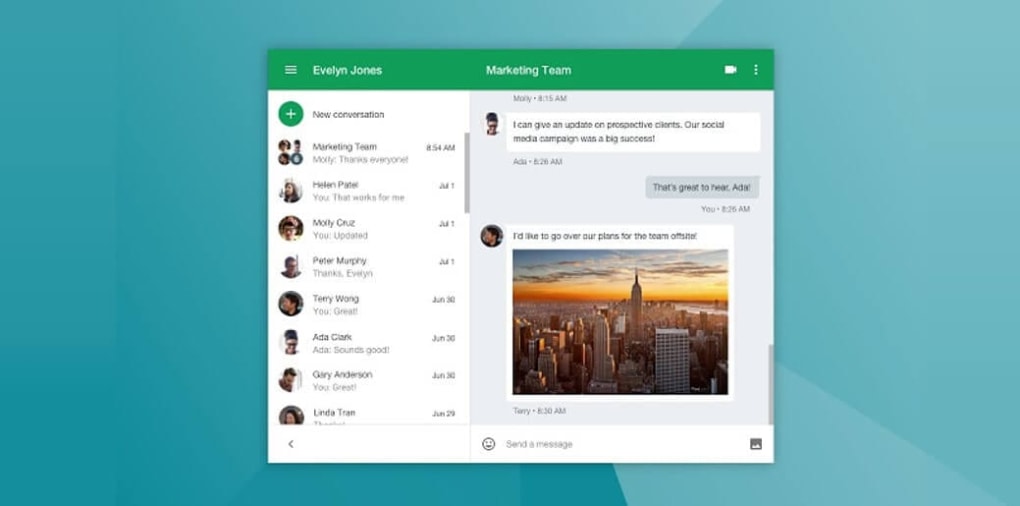
Google Hangouts is a free, unified messaging network that brings together email, voice, and video chat under a single, easy‑to‑use interface. Integrated tightly with Gmail and Google+, Hangouts lets you reach contacts across multiple platforms—desktop browsers, Windows PCs, macOS, Android tablets, and iOS devices—without the bloat of modern social apps. The core purpose of Hangouts is simple: provide a reliable, secure way to start conversations, share media, and host group calls.
Whether you’re coordinating a remote work meeting, catching up with friends, or holding a virtual classroom, Hangouts offers a clean GUI, end‑to‑end encryption for calls, and the ability to archive chats for later reference. While the service requires an invitation to begin a new conversation, once you’re connected you can enjoy group chats of up to 150 participants and video calls for up to 10 people. The platform’s emphasis on essential features—text, emojis, images, voice, and video—makes it a solid alternative to feature‑heavy competitors that distract users with games or stories.
Hangouts remains a versatile, low‑maintenance communication hub that works across the web, Windows, macOS, Android, and iOS, keeping your conversations organized and accessible.
Key Features & Benefits
- Unified messaging across Gmail, Google+, and contacts.
- Free voice and video calls with up to 10 participants.
- Group chat support for up to 150 users per conversation.
- Media sharing: photos, GIFs, emojis, and file attachments.
- Chat archiving for easy retrieval of past discussions.
- Cross‑platform availability: web, Windows, macOS, Android, iOS.
- End‑to‑end encryption for voice and video streams.
- Simple, clutter‑free interface focused on communication.
- Integration with Google Calendar for instant meeting scheduling.
- Free to use with a Google account—no hidden fees or subscriptions.
These features combine to create a tool that balances simplicity with powerful collaboration capabilities. The ability to start a video call directly from a chat window eliminates the need for third‑party conferencing software, while the generous participant limits make Hangouts suitable for everything from small team stand‑ups to larger webinars. Because it’s tied to your Google account, contacts are automatically synced, reducing the friction of manually adding friends or colleagues.
Moreover, the archival system helps keep your inbox tidy; archived threads remain searchable and can be restored at any time, ensuring that important information isn’t lost. For users who value privacy, Google’s encryption safeguards both audio and visual data, giving peace of mind during sensitive conversations. Overall, Hangouts delivers a reliable, no‑frills communication experience that can serve personal, educational, and professional contexts alike.
Installation, Usage & Compatibility
Getting Started on Different Devices
Installing Hangouts is straightforward because the service is primarily web‑based. For desktop users, simply open any modern browser (Chrome, Firefox, Edge, Safari) and navigate to hangouts.google.com. Sign in with your Google credentials, and you’ll instantly see your contacts list, recent chats, and a “New Conversation” button. No additional download is required for the web version, making it an ideal solution for users who prefer not to install extra software.
On Windows or macOS, you can also use the standalone Hangouts Chrome app for a more native feel. Search for “Hangouts” in the Chrome Web Store, click “Add to Chrome,” and the app will appear as a dedicated window, keeping your chats separate from other tabs. The app automatically updates in the background, ensuring you always have the latest security patches.
Mobile users enjoy a fully featured native app. On Android, open the Google Play Store, search for “Google Hangouts,” and tap “Install.” The iOS version is available in the Apple App Store under the same name. Both mobile apps support push notifications, voice/video calls, and offline message storage. After installation, log in with the same Google account you use on the web, and your conversation history syncs instantly across devices.
Using Hangouts Effectively
Once logged in, start a new conversation by clicking the green “+” icon and selecting a contact or entering an email address. To create a group chat, add multiple participants before sending the first message. Hangouts allows you to send text, emojis, and attach images or files directly from the chat window. For voice or video calls, click the phone or video camera icon at the top of the conversation. The call interface offers mute, screen‑share, and participant management controls, making it suitable for informal chats or formal meetings.
To keep your inbox organized, use the archive function (click the three‑dot menu on a conversation and select “Archive”). Archived chats disappear from the main view but remain searchable. If you need to leave a conversation, choose “Leave conversation” from the same menu—note that you will lose access to future messages in that thread.
Supported Operating Systems
Hangouts works on the following operating systems: Windows 7 and later, macOS 10.12 Sierra and later, Android 5.0 Lollipop and later, iOS 11 and later, as well as any modern web browser on Linux or ChromeOS.
The broad compatibility ensures that you can stay connected whether you’re at home, in the office, or on the move. Because the service relies on Google’s cloud infrastructure, updates are applied server‑side, meaning you rarely need to manually patch the app. This seamless update process contributes to the tool’s reputation for security and reliability.
Pros, Cons & Frequently Asked Questions
Pros
- Completely free with no hidden subscription fees.
- Cross‑platform support for web, desktop, Android, and iOS.
- High participant limits for both chat (150) and video calls (10).
- Integrated with Gmail and Google Calendar for streamlined workflow.
- End‑to‑end encryption ensures secure voice and video communications.
- Simple, clutter‑free interface focused on core messaging features.
- Automatic syncing of chat history across all devices.
Cons
- Requires a Google account; no guest or anonymous access.
- Cannot initiate a conversation without sending an invitation first.
- Lacks advanced collaboration tools like built‑in file editing or whiteboarding.
- Deprecated features (e.g., Hangouts integration with Google+) may cause occasional UI inconsistencies.
- Limited customization options for themes or notification sounds.
FAQ
Is Google Hangouts still supported by Google?
Yes, Hangouts remains part of Google’s communication suite, though Google is gradually transitioning users to Google Chat and Meet. Existing Hangouts accounts continue to function and receive security updates.
Can I use Hangouts without an internet connection?
Hangouts requires an active internet connection for sending messages and making calls. However, offline messages typed while disconnected are queued and sent automatically once you reconnect.
How secure are Hangouts video calls?
All Hangouts voice and video calls are encrypted with Transport Layer Security (TLS) and, in many cases, end‑to‑end encryption, protecting the content from eavesdropping.
What file types can I share in a Hangouts conversation?
You can share images (JPG, PNG, GIF), documents (PDF, DOCX), and standard media files (MP4, MP3) up to 25 MB per attachment.
Can I integrate Hangouts with third‑party productivity tools?
Hangouts offers limited native integrations, but you can connect it to Google Calendar for meeting invites and use Zapier or IFTTT to bridge it with other services.
Conclusion & Call‑to‑Action
Google Hangouts delivers a no‑frills, reliable messaging experience that excels in environments where simplicity and cross‑device continuity matter most. Its integration with Gmail and Google Calendar streamlines daily workflows, while the generous chat and video participant caps make it suitable for both personal gatherings and modest‑scale business meetings. Although it lacks the extensive collaboration suite of newer Google Chat and Meet platforms, Hangouts remains a solid, free alternative for users who prioritize a clean interface and secure communication. If you’re looking for a straightforward tool to keep in touch with friends, family, or a small team—without the distraction of games, stories, or premium subscriptions—Hangouts is worth downloading today.
Ready to start chatting? Download Hangouts now and enjoy free, secure voice and video calls across all your devices.



.png)



